
Find out what is wrong with your PC. Safely.Βρες τι φταίει στον υπολογιστή σου. Με ασφάλεια.
VEAGLE PC Check scans your Windows PC (it only reads, it never changes anything), builds a clear report, and can hand the findings to an AI for a second opinion. No account, nothing is uploaded.Το VEAGLE PC Check σαρώνει τον υπολογιστή σου με Windows (μόνο διαβάζει, τίποτα δεν αλλάζει), φτιάχνει μια καθαρή αναφορά και, αν θέλεις, δίνει τα ευρήματα σε ένα AI για δεύτερη γνώμη. Χωρίς λογαριασμό, δεν ανεβαίνει τίποτα.
- Windows 10 and 11Windows 10 και 11
- 3 to 8 minutes (quick scan: 30 seconds)3 έως 8 λεπτά (quick scan: 30 δευτ.)
- Reads only, changes nothingΜόνο ανάγνωση, δεν αλλάζει τίποτα
- No install, no accountΧωρίς εγκατάσταση, χωρίς λογαριασμό
How it worksΠώς δουλεύει
Download and unzipΚατέβασε και αποσυμπίεσε
Download the ZIP (it lands in your Downloads folder). Right-click it, choose Extract All, then click Extract. Never run anything from inside the ZIP.Κατέβασε το ZIP (πάει στον φάκελο Λήψεις). Δεξί κλικ, Extract All (Εξαγωγή όλων), και μετά Extract. Μην τρέξεις ποτέ τίποτα μέσα από το ZIP.
Double-click the launcherΔιπλό κλικ στο αρχείο εκκίνησης
Open the new folder and double-click VEAGLE-PC-Check.bat. Windows asks if it may make changes: click Yes (the check only reads, it changes nothing). A black window shows progress, wait 3 to 8 minutes. In a hurry? Use the Quick launcher (about 30 seconds).Άνοιξε τον νέο φάκελο και κάνε διπλό κλικ στο VEAGLE-PC-Check.bat. Τα Windows ρωτούν αν επιτρέπουν αλλαγές: πάτα Yes (το πρόγραμμα μόνο διαβάζει, δεν αλλάζει τίποτα). Ένα μαύρο παράθυρο δείχνει την πρόοδο, περίμενε 3 έως 8 λεπτά. Βιάζεσαι; Χρησιμοποίησε το Quick (περίπου 30 δευτερόλεπτα).
Read the reportΔιάβασε την αναφορά
Your browser opens the report. Look at the box Do this first. Every problem explains itself in plain words, with the time it takes, how risky it is, and exact steps.Ο browser ανοίγει την αναφορά. Κοίτα το κουτί Do this first. Κάθε πρόβλημα εξηγείται με απλά λόγια, με τον χρόνο που θέλει, το ρίσκο και ακριβή βήματα.
What you getΤι παίρνεις
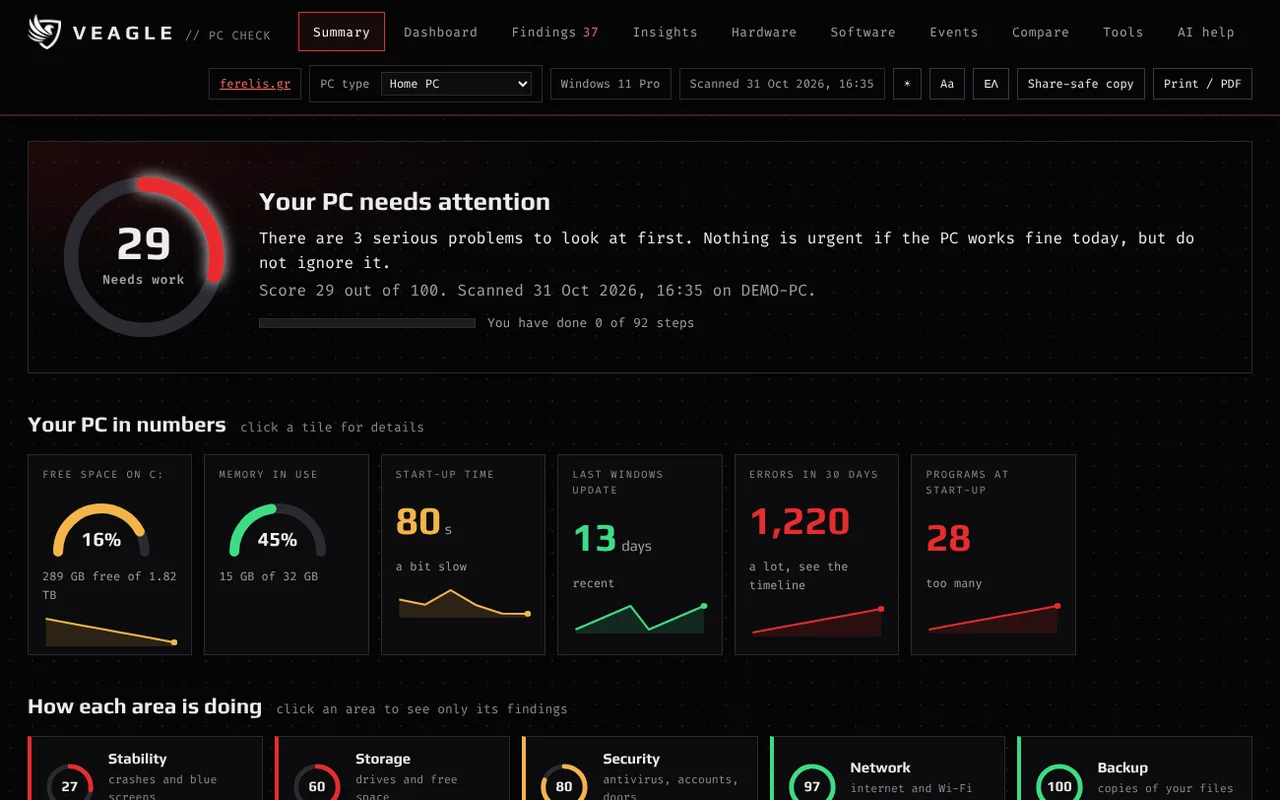
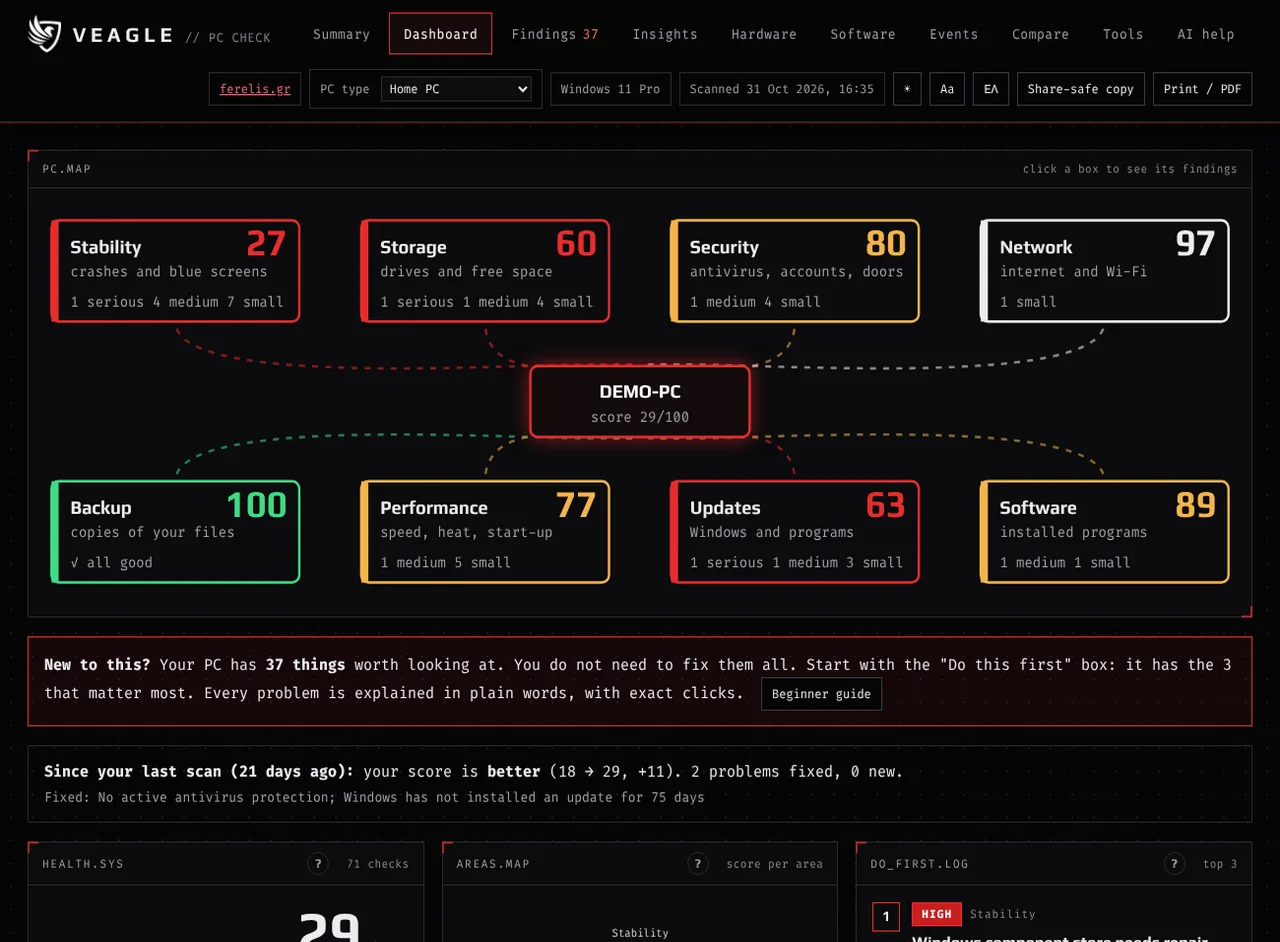
Your PC at a glanceΟ υπολογιστής σου με μια ματιά
Processor, memory, graphics, motherboard, drives, Windows, network and security on one screen, with a health score, a score per area and the three things to do first.Επεξεργαστής, μνήμη, κάρτα γραφικών, μητρική, δίσκοι, Windows, δίκτυο και ασφάλεια σε μία οθόνη, με βαθμολογία υγείας, βαθμό ανά τομέα και τα τρία πρώτα βήματα.
Problems explained, fixes includedΠροβλήματα εξηγημένα, με διορθώσεις
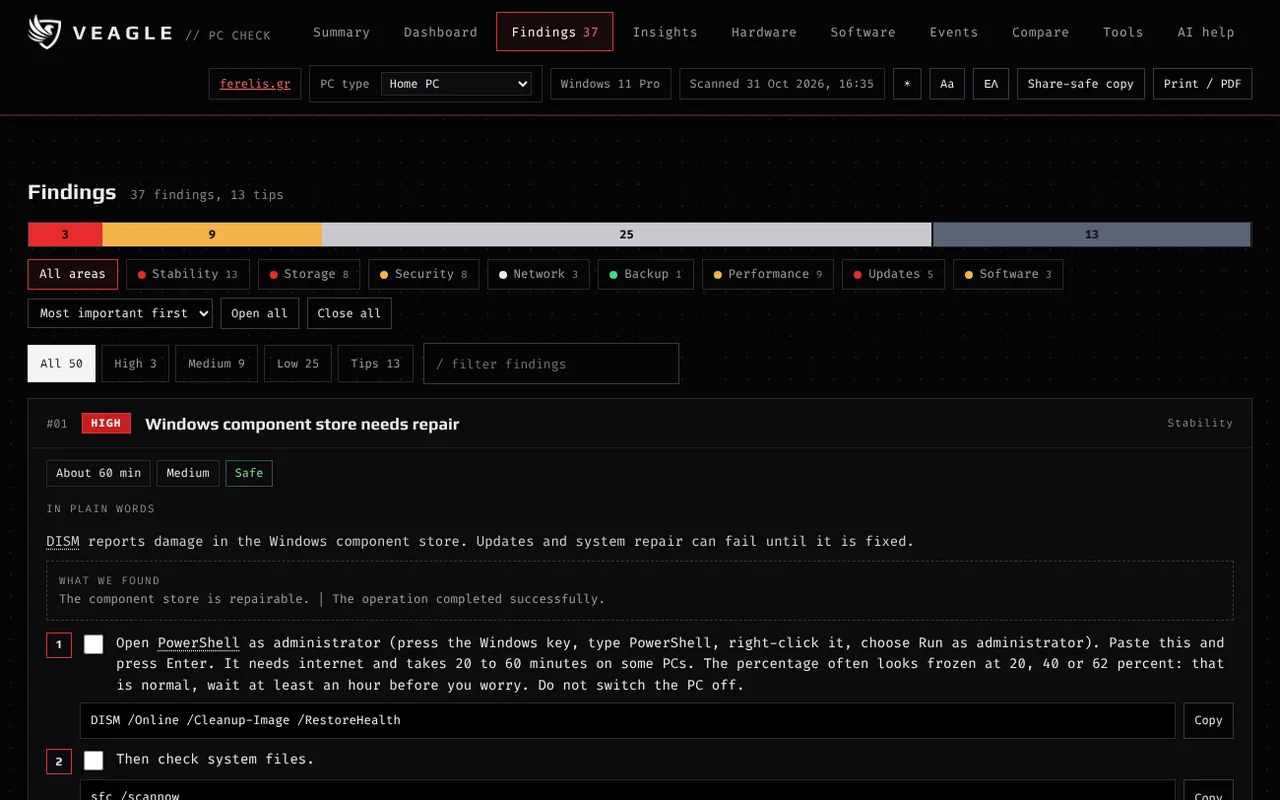
Around 100 checks turn Windows logs and settings into findings ranked by priority. Each one says what it means in plain words, how long the fix takes, how risky it is, and gives exact clicks and commands you can copy. Harmless noise is separated from real problems.Περίπου 100 έλεγχοι μετατρέπουν τα logs και τις ρυθμίσεις των Windows σε ευρήματα με σειρά προτεραιότητας. Κάθε εύρημα λέει με απλά λόγια τι σημαίνει, πόση ώρα θέλει και πόσο ρίσκο έχει, και δίνει ακριβή κλικ και εντολές που αντιγράφονται. Ο αβλαβής θόρυβος ξεχωρίζει από τα πραγματικά προβλήματα.
A second opinion from an AIΔεύτερη γνώμη από AI
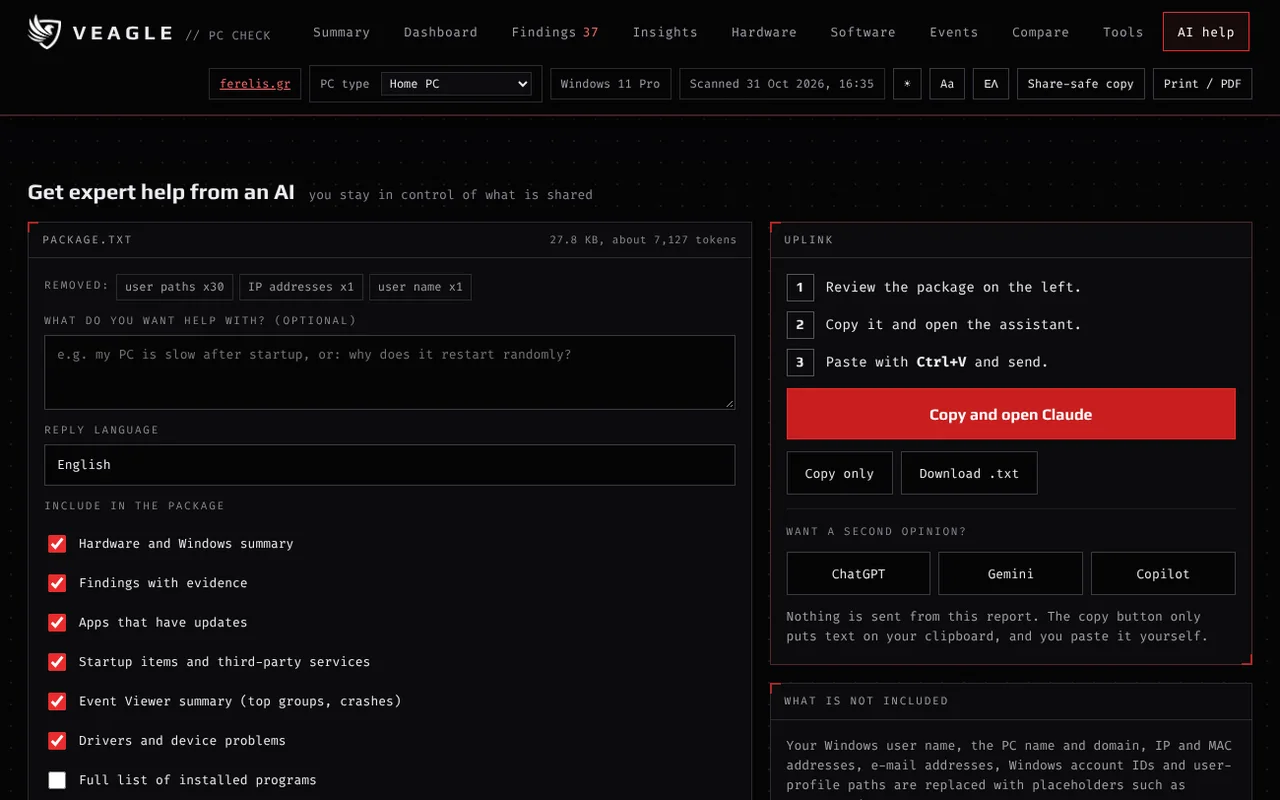
One click builds a package from your scan with your user name, PC name, IP and MAC addresses and e-mails removed. You see exactly what is copied. It opens Claude first; ChatGPT, Gemini and Copilot are there for another opinion.Ένα κλικ φτιάχνει πακέτο από τη σάρωση, χωρίς όνομα χρήστη, όνομα PC, διευθύνσεις IP και MAC και email. Βλέπεις ακριβώς τι αντιγράφεται. Ανοίγει πρώτα το Claude· το ChatGPT, το Gemini και το Copilot υπάρχουν για μια επιπλέον γνώμη.
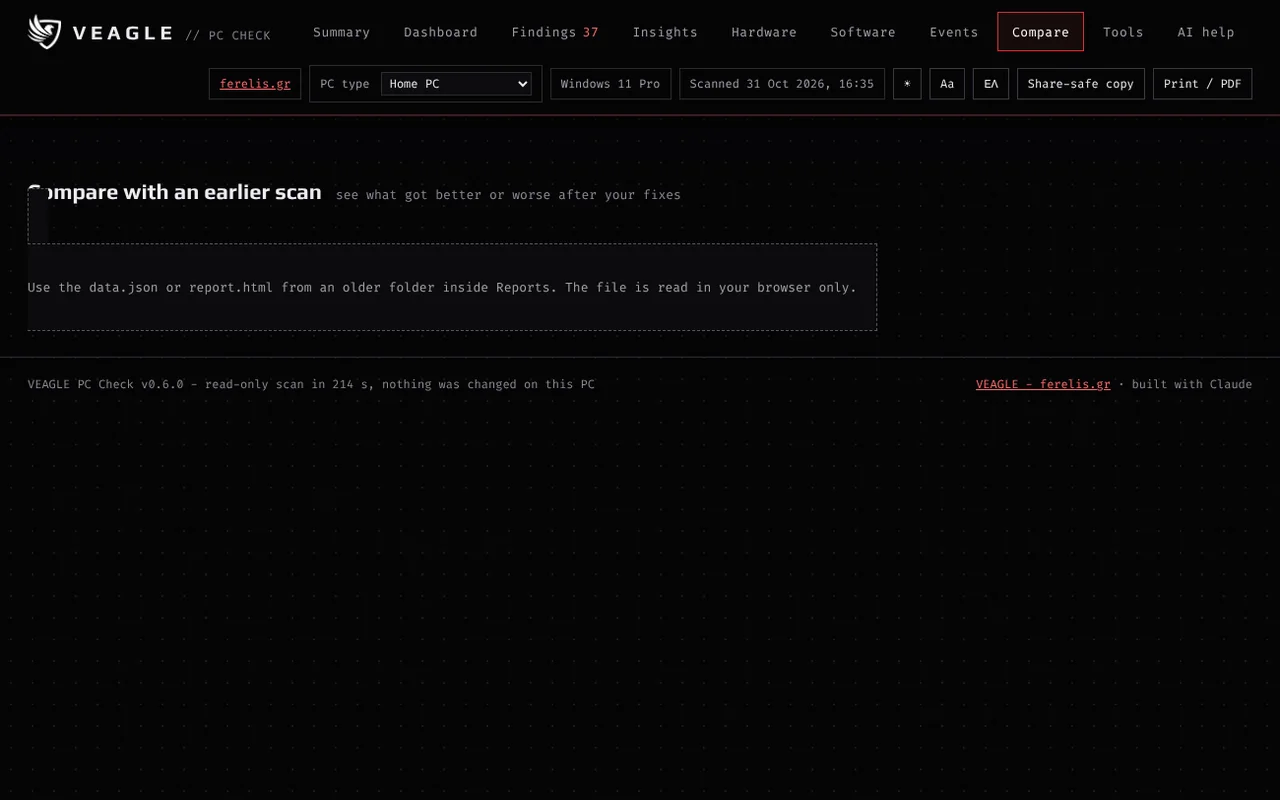
Before and afterΠριν και μετά
Drop an older scan into the Compare tab and see what got better or worse after your fixes: score, free space, startup programs, boot time, errors.Σύρε μια παλιότερη σάρωση στην καρτέλα Compare και δες τι βελτιώθηκε ή χειροτέρεψε μετά τις διορθώσεις σου: βαθμολογία, ελεύθερος χώρος, προγράμματα εκκίνησης, χρόνος boot, σφάλματα.
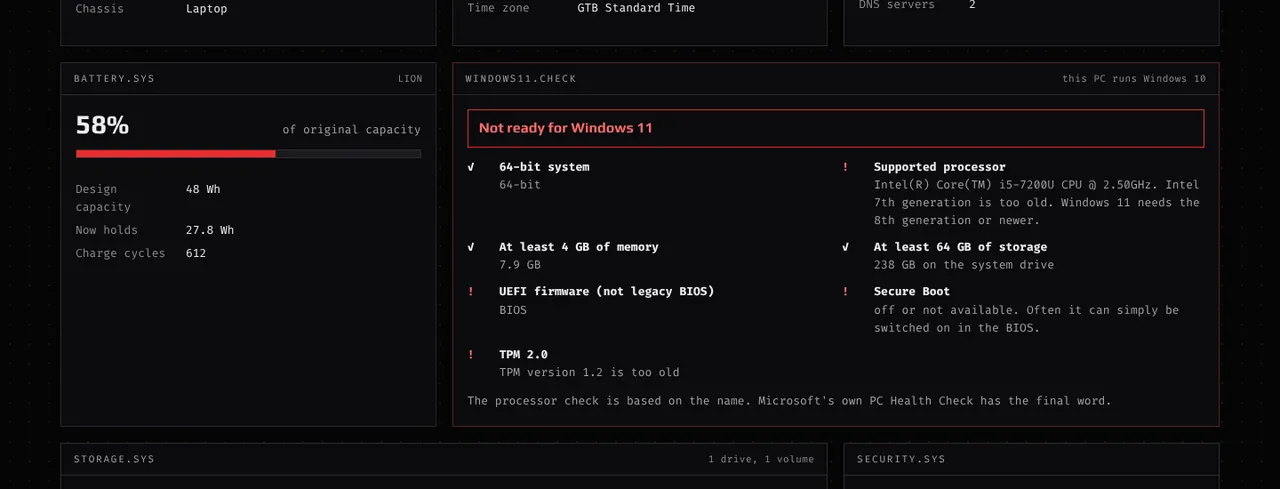
Windows 11 readiness and battery healthΈτοιμος για Windows 11 και υγεία μπαταρίας
On Windows 10 it checks the Windows 11 requirements one by one. On a laptop it shows how much capacity the battery has lost.Σε Windows 10 ελέγχει τις απαιτήσεις των Windows 11 μία-μία. Σε laptop δείχνει πόση χωρητικότητα έχει χάσει η μπαταρία.
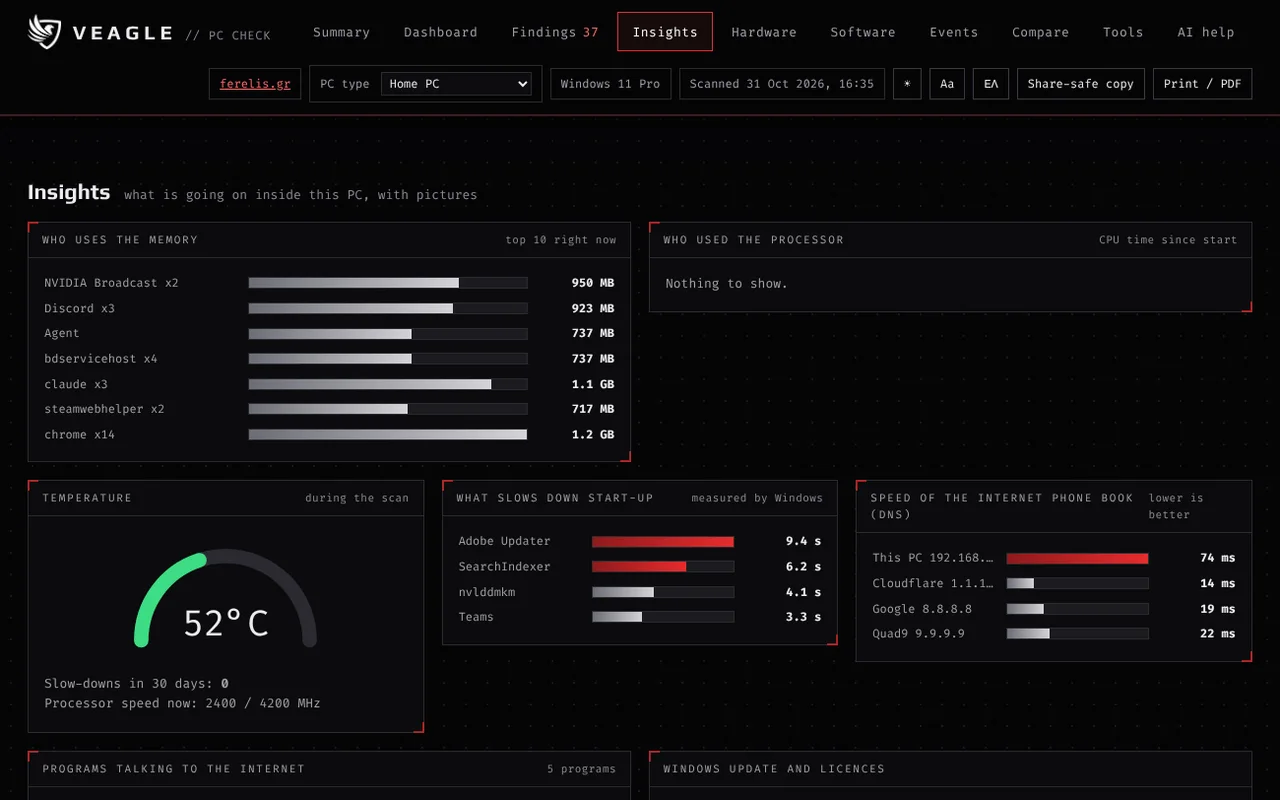
It connects the dotsΣυνδέει τα σημεία
A 30-day timeline puts crashes, drive errors, updates and installs on one line. The report then looks for patterns: crashes that began right after an update or a new program, crashes right after waking from sleep, drive errors right before a crash, slower starts after an update. Plain words, with exact steps.Ένα χρονολόγιο 30 ημερών βάζει κρασαρίσματα, σφάλματα δίσκου, ενημερώσεις και εγκαταστάσεις σε μία γραμμή. Η αναφορά ψάχνει μετά για μοτίβα: κρασαρίσματα που ξεκίνησαν αμέσως μετά από ενημέρωση ή νέο πρόγραμμα, κρασαρίσματα αμέσως μετά το ξύπνημα από ύπνο, σφάλματα δίσκου λίγο πριν από κρασάρισμα, πιο αργές εκκινήσεις μετά από ενημέρωση. Με απλά λόγια και ακριβή βήματα.
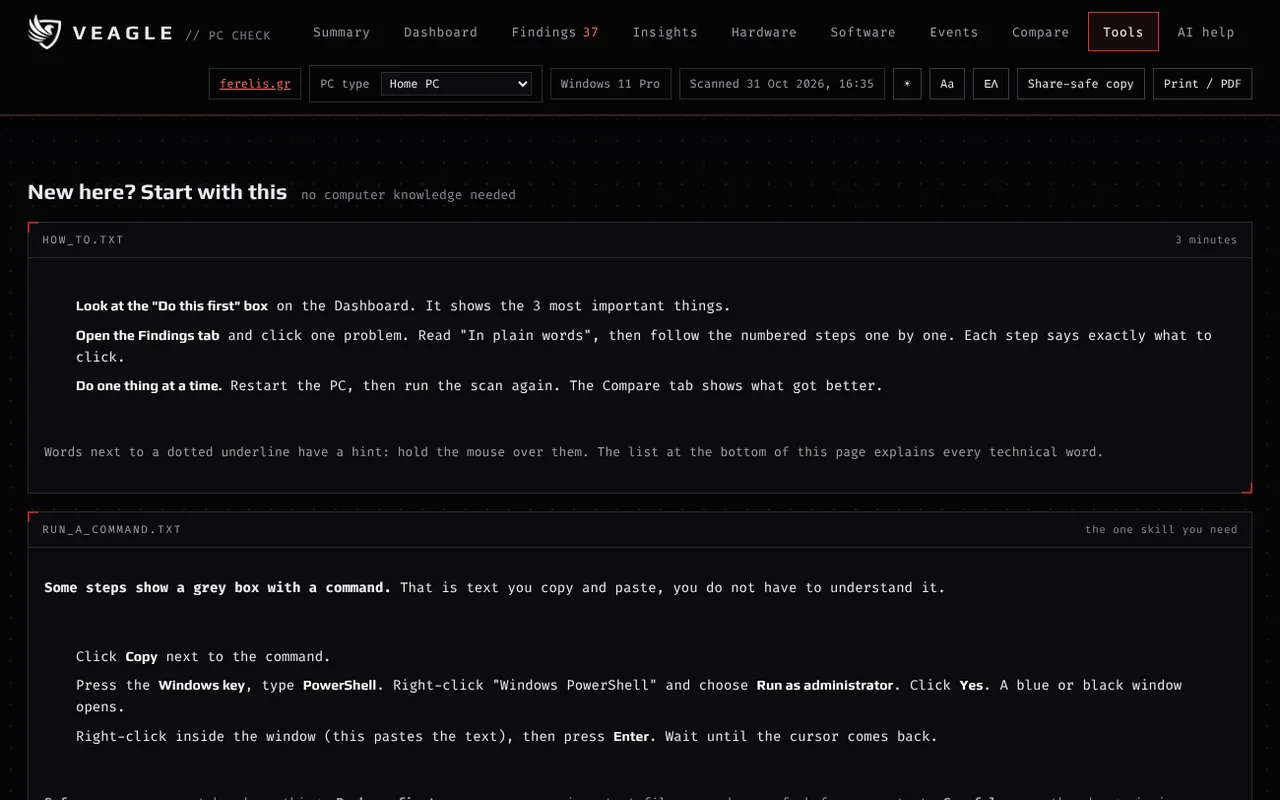
Made for complete beginnersΦτιαγμένο για εντελώς αρχάριους
A beginner guide, hints on every technical word, a message you can send to a helper, and a fix script where every command is switched off until you decide. The whole report is also in Greek (button EN / ΕΛ), and it remembers your last scan to show your progress. Pick Home, Work or Gaming PC and the report puts what matters to you first. Compare many PCs in one table. A monthly check exists only if you choose it. A light theme, bigger text, a step checklist with progress, charts of your progress over time and a guide for moving from Windows 10 to 11 make it comfortable to use. Nothing is ever changed for you.Οδηγός για αρχάριους, επεξήγηση σε κάθε τεχνικό όρο, μήνυμα που στέλνεις σε όποιον σε βοηθά, και script διορθώσεων όπου κάθε εντολή είναι κλειστή μέχρι να αποφασίσεις εσύ. Όλη η αναφορά υπάρχει και στα ελληνικά (κουμπί EN / ΕΛ) και θυμάται την τελευταία σάρωση για να δείξει την πρόοδό σου. Διάλεξε Home, Work ή Gaming PC και η αναφορά βάζει πρώτα ό,τι σε αφορά. Σύγκρινε πολλά PC σε έναν πίνακα. Μηνιαίος έλεγχος υπάρχει μόνο αν τον επιλέξεις. Ανοιχτό θέμα, μεγαλύτερα γράμματα, λίστα βημάτων με πρόοδο, γραφήματα εξέλιξης και οδηγός για τη μετάβαση από Windows 10 σε 11 το κάνουν άνετο στη χρήση. Τίποτα δεν αλλάζει ποτέ για λογαριασμό σου.
Also: a share-safe copy of the report with personal details removed, a quick scan, and print or save as PDF.Επίσης: share-safe αντίγραφο της αναφοράς χωρίς προσωπικά στοιχεία, quick scan, και εκτύπωση ή αποθήκευση σε PDF.
What it reads, and what it never touchesΤι διαβάζει και τι δεν αγγίζει ποτέ
It readsΔιαβάζει
- Hardware: processor, memory, graphics, motherboard, BIOS, drives (health, free space)
- Windows version, updates, power and performance settings
- Security state: Secure Boot, TPM, BitLocker status, antivirus, firewall
- The list of installed programs and what starts with Windows
- Errors and warnings from the Windows Event Viewer (last 30 days)
- Devices and drivers with problems, laptop battery report
- Υλικό: επεξεργαστής, μνήμη, κάρτα γραφικών, μητρική, BIOS, δίσκοι (υγεία, ελεύθερος χώρος)
- Έκδοση Windows, ενημερώσεις, ρυθμίσεις ενέργειας και απόδοσης
- Κατάσταση ασφάλειας: Secure Boot, TPM, BitLocker, antivirus, firewall
- Τη λίστα των εγκατεστημένων προγραμμάτων και τι ξεκινά με τα Windows
- Σφάλματα και προειδοποιήσεις από το Event Viewer (τελευταίες 30 ημέρες)
- Συσκευές και drivers με προβλήματα, αναφορά μπαταρίας σε laptop
It never touchesΔεν αγγίζει ποτέ
- Passwords, product keys, Wi-Fi passwords, the recovery key of BitLocker
- Your files, documents, photos, e-mails or browsing history
- Your online accounts
- It does not change settings, install, delete or upload anything. The only network use: winget is asked which of your programs have updates, one ping goes to your own router, and a few name lookups are made (www.microsoft.com, plus a speed comparison against Cloudflare, Google and Quad9 in the full scan)
- The serial number of the PC is read only for your own inventory file. It is never in the AI package or in the share-safe copy
- Κωδικούς, κλειδιά προϊόντος, κωδικούς Wi-Fi, το κλειδί ανάκτησης του BitLocker
- Τα αρχεία, έγγραφα, φωτογραφίες, email ή ιστορικό περιήγησης σου
- Τους online λογαριασμούς σου
- Δεν αλλάζει ρυθμίσεις, δεν εγκαθιστά, δεν διαγράφει και δεν ανεβάζει τίποτα. Η μόνη χρήση δικτύου: το winget ρωτάται ποια προγράμματα έχουν ενημέρωση, γίνεται ένα ping στο δικό σου router και λίγες αναζητήσεις ονομάτων (www.microsoft.com, και στην πλήρη σάρωση σύγκριση ταχύτητας με Cloudflare, Google και Quad9)
- Ο σειριακός αριθμός του υπολογιστή διαβάζεται μόνο για το δικό σου αρχείο απογραφής. Δεν μπαίνει ποτέ στο πακέτο για AI ούτε στο αντίγραφο για κοινοποίηση
DownloadΚατέβασμα
Version 0.6.5, 1 Nov 2026, 763 KB. Windows 10 or 11, PowerShell 5.1 (already included).Έκδοση 0.6.5, 1 Nov 2026, 763 KB. Windows 10 ή 11, PowerShell 5.1 (ήδη συμπεριλαμβάνεται).
Check that the file is the original (SHA-256)Έλεγξε ότι το αρχείο είναι το γνήσιο (SHA-256)
9f16aea3872f57ba4920f5a2b934fe0ba989f7ce15063f5be71768ffe7c42835After downloading, run this in PowerShell in the folder with the ZIP. The result must be the same as the line above.Μετά τη λήψη, τρέξε αυτή την εντολή στο PowerShell, στον φάκελο με το ZIP. Το αποτέλεσμα πρέπει να είναι ίδιο με την παραπάνω γραμμή.
Get-FileHash .\VEAGLE-PC-Check-v0.6.5.zip -Algorithm SHA256Read the code before you run itΔιάβασε τον κώδικα πριν τον τρέξεις
Both files that run on your PC are plain text. Open them here or in Notepad: the launcher (.bat) and the scan script (collector.ps1). The whole project, including the report builder, is in the source folder.Τα δύο αρχεία που τρέχουν στον υπολογιστή σου είναι απλό κείμενο. Άνοιξέ τα εδώ ή στο Σημειωματάριο: το αρχείο εκκίνησης (.bat) και το script της σάρωσης (collector.ps1). Ολόκληρο το project, μαζί με τον δημιουργό της αναφοράς, είναι στον φάκελο source.
ManualManual
1. What you need1. Τι χρειάζεσαι
- Windows 10 or 11, 64-bit.
- Windows PowerShell 5.1. It is part of Windows, nothing to install.
- Administrator rights for the full scan (drive health, BitLocker and the Windows image check need them).
- A browser: Edge, Chrome or Firefox.
- About 30 MB of free space for the Reports folder (most of it is the optional msinfo32 export).
- Internet only for the winget update lookup and for the AI help.
- Windows 10 ή 11, 64-bit.
- Windows PowerShell 5.1. Είναι μέρος των Windows, δεν χρειάζεται εγκατάσταση.
- Δικαιώματα διαχειριστή για την πλήρη σάρωση (τα χρειάζονται η υγεία δίσκων, το BitLocker και ο έλεγχος του Windows image).
- Έναν browser: Edge, Chrome ή Firefox.
- Περίπου 30 MB ελεύθερου χώρου για τον φάκελο Reports (το μεγαλύτερο μέρος είναι το προαιρετικό export του msinfo32).
- Δίκτυο μόνο για το winget και για το AI help.
2. Running a scan2. Πώς τρέχει μια σάρωση
Extract the whole ZIP first (do not run the files from inside the ZIP). Then:
- VEAGLE-PC-Check.bat: the full scan, 3 to 8 minutes. It also exports msinfo32 and checks for app updates (winget) and for damage in the Windows image (DISM).
- VEAGLE-PC-Check-Quick.bat: about 30 seconds. It skips msinfo32, winget, DISM, optional features, old-driver and folder-size checks. The report says it was a quick scan.
Windows asks for administrator rights. A black window shows progress; when it says Done, the report opens in your browser. Everything lands in a new folder Reports\<date-time> next to the launcher.
Αποσυμπίεσε πρώτα όλο το ZIP (μην τρέχεις τα αρχεία από μέσα από το ZIP). Μετά:
- VEAGLE-PC-Check.bat: η πλήρης σάρωση, 3 έως 8 λεπτά. Εξάγει και το msinfo32 και ελέγχει για ενημερώσεις προγραμμάτων (winget) και για βλάβη στο Windows image (DISM).
- VEAGLE-PC-Check-Quick.bat: περίπου 30 δευτερόλεπτα. Παραλείπει msinfo32, winget, DISM, optional features και τους ελέγχους παλιών drivers και μεγέθους φακέλων. Η αναφορά γράφει ότι ήταν quick scan.
Τα Windows ζητούν δικαιώματα διαχειριστή. Ένα μαύρο παράθυρο δείχνει την πρόοδο. Όταν γράψει Done, η αναφορά ανοίγει στον browser. Όλα βρίσκονται σε νέο φάκελο Reports\<ημερομηνία-ώρα> δίπλα στο αρχείο εκκίνησης.
3. Understanding the report3. Πώς διαβάζεις την αναφορά
- Dashboard: the health score, a radar of eight areas (Stability, Storage, Security, Network, Backup, Performance, Updates, Software), the three things to do first, and your hardware and Windows at a glance.
- Findings: every problem with a reason, evidence and fix steps. Click one to open it. Commands have a Copy button. Looking good lists what passed.
- Hardware, Software, Events: all the details, tables you can search.
- Tools: a beginner guide, a short message for a helper, a fix script (all commands switched off), CSV export, a table of many PCs and a list of explained words.
- Compare: drop an older data.json or report.html to see what changed.
- AI help: the package for an AI, see below.
| Level | Meaning | What to do |
|---|---|---|
| HIGH | Real risk or something broken. | Fix soon, start here. |
| MEDIUM | Hurts speed, stability or safety. | Fix when you can. |
| LOW | Small issue or tidy-up. | Optional. |
| TIP | Good to know, not counted in the score. | Read it. |
The score starts at 100 and loses 8 points per high finding, 3 per medium and 0.8 per low. 85 and above is in good shape, 60 to 84 needs attention, below 60 needs work. Old one-off events lose weight: a burst of errors that stopped two weeks ago counts less than a problem that is still happening.
- Dashboard: η βαθμολογία υγείας, radar οκτώ τομέων (Stability, Storage, Security, Network, Backup, Performance, Updates, Software), τα τρία πρώτα βήματα, και το υλικό και τα Windows σου με μια ματιά.
- Findings: κάθε πρόβλημα με αιτιολόγηση, τεκμήρια και βήματα διόρθωσης. Κάνε κλικ για να ανοίξει. Οι εντολές έχουν κουμπί Copy. Το Looking good δείχνει ό,τι έλεγχος έπερασε.
- Hardware, Software, Events: όλες οι λεπτομέρειες, πίνακες με αναζήτηση.
- Tools: οδηγός για αρχάριους, σύντομο μήνυμα για όποιον σε βοηθά, script διορθώσεων (όλες οι εντολές κλειστές), εξαγωγή σε CSV, πίνακας πολλών PC και λίστα με εξηγημένους όρους.
- Compare: σύρε ένα παλιό data.json ή report.html για να δεις τι άλλαξε.
- AI help: το πακέτο για AI, δες παρακάτω.
| Επίπεδο | Τι σημαίνει | Τι κάνεις |
|---|---|---|
| HIGH | Πραγματικός κίνδυνος ή κάτι σπασμένο. | Διόρθωσε γρήγορα, ξεκίνα από εδώ. |
| MEDIUM | Βλάπτει ταχύτητα, σταθερότητα ή ασφάλεια. | Διόρθωσε όταν μπορείς. |
| LOW | Μικρό θέμα ή νοικοκυριά. | Προαιρετικό. |
| TIP | Διάβασέ το, δεν μέτραει στη βαθμολογία. | Διάβασέ το. |
Η βαθμολογία ξεκινά από 100 και χάνει 8 πόντους ανά high εύρημα, 3 ανά medium και 0,8 ανά low. Από 85 και πάνω είναι In good shape, 60 έως 84 Needs attention, κάτω από 60 Needs work. Τα παλιά μοναδικά γεγονότα έχουν λιγότερο βάρος: μια έκρηξη σφαλμάτων που τελείωσε πριν δύο εβδομάδες μετράει λιγότερο από ένα πρόβλημα που συνεχίζεται.
4. Fixing things safely4. Πώς διορθώνεις πράγματα με ασφάλεια
- Start with the high findings. Change one thing at a time.
- Before bigger changes, create a restore point. Run this in PowerShell as Administrator: Checkpoint-Computer -Description "Before VEAGLE fixes" -RestorePointType MODIFY_SETTINGS
- Commands run in PowerShell as Administrator (Start, type PowerShell, right-click, Run as administrator), unless the step says otherwise.
- Restart when asked, then run the Quick scan again and use Compare to confirm the fix worked.
The app never changes anything by itself. Every fix is a step you choose to take.
- Ξεκίνα από τα ευρήματα high. Αλλάξε ένα πράγμα τη φορά.
- Πριν από μεγαλύτερες αλλαγές, κάνε restore point. Τρέξε στο PowerShell ως Administrator: Checkpoint-Computer -Description "Before VEAGLE fixes" -RestorePointType MODIFY_SETTINGS
- Οι εντολές τρέχουν στο PowerShell ως Administrator (Start, γράψε PowerShell, δεξί κλικ, Run as administrator), εκτός αν το βήμα λέει κάτι άλλο.
- Κάνε επανεκκίνηση όταν το ζητάει, τρέξε ξανά το Quick scan και χρησιμοποίησε το Compare για να δεις ότι η διόρθωση έπιασε.
Η εφαρμογή δεν αλλάζει ποτέ τίποτα μόνη της. Κάθε διόρθωση είναι βήμα που επιλέγεις εσύ.
5. Sharing safely and getting AI help5. Ασφαλής κοινοποίηση και βοήθεια από AI
- Open the AI help tab. Optionally write what you need help with, and the language you want the answer in.
- Choose what to include and read the preview. It is exactly what will be copied.
- Click Copy and open Claude, then press Ctrl+V in the new tab. For a second opinion use the ChatGPT, Gemini or Copilot buttons.
- If pasting is not possible, use Download .txt and attach the file.
Removed before anything is copied: your Windows user name, the PC and domain name, IP and MAC addresses, e-mail addresses, account IDs and your user-profile paths. Still read the preview: program names can say something about you.
The Share-safe copy button (top right) saves the whole report as a new HTML file with the same details removed, so you can send it to a friend or a technician.
- Άνοιξε την καρτέλα AI help. Γράψε, αν θέλεις, τι βοήθεια χρειάζεσαι και σε ποια γλώσσα θέλεις την απάντηση.
- Διάλεξε τι θα συμπεριλάβει το πακέτο και διάβασε την προεπισκόπηση. Είναι ακριβώς ό,τι θα αντιγραφεί.
- Πάτα Copy and open Claude και μετά Ctrl+V στη νέα καρτέλα. Για δεύτερη γνώμη χρησιμοποίησε τα κουμπιά ChatGPT, Gemini ή Copilot.
- Αν δεν γίνεται επικόλληση, χρησιμοποίησε το Download .txt και συνένωσε το αρχείο.
Πριν αντιγραφεί τίποτα αφαιρούνται: το όνομα χρήστη των Windows, το όνομα PC και domain, διευθύνσεις IP και MAC, email, account IDs και τα paths του προφίλ χρήστη. Διάβασε πάντα την προεπισκόπηση: τα ονόματα προγραμμάτων μπορεί να λένε κάτι για εσένα.
Το κουμπί Share-safe copy (πάνω δεξιά) αποθηκεύει όλη την αναφορά ως νέο HTML αρχείο χωρίς αυτά τα στοιχεία, ώστε να το στείλεις σε φίλο ή τεχνικό.
Frequently asked questionsΣυχνές ερωτήσεις
Is it safe?Είναι ασφαλές;
Why does it ask for administrator rights?Γιατί ζητά δικαιώματα διαχειριστή;
Windows or my antivirus warns meΤα Windows ή το antivirus μου με προειδοποιούν
The black window closes at onceΤο μαύρο παράθυρο κλείνει αμέσως
It takes very longΠαίρνει πολύ ώρα
Some checks say "unknown"Κάποιοι έλεγχοι δείχνουν "unknown"
Where are my results, and how do I delete them?Πού είναι τα αποτελέσματά μου και πώς τα σβήνω;
How do I uninstall it?Πώς το απεγκαθιστώ;
Can I use it on a work PC?Μπορώ να το χρησιμοποιήσω σε υπολογιστή δουλειάς;
Version historyΙστορικό εκδόσεων
v0.6.5 · 1 Nov 2026 - The version number is shown at the top of the report next to the...
v0.6.4 · 1 Nov 2026 - A note at the top of the report ("Before you read the results": if...
v0.6.3 · 1 Nov 2026 - Small polish of the new look: long Greek texts now fit inside the...
v0.6.2 · 1 Nov 2026 - Fixes after the first scan with the new checks: a hidden error that...
v0.6.1 · 1 Nov 2026 - A new look for the report: a map of your PC on the dashboard (one box...
v0.6.0 · 1 Nov 2026 - 33 new things: security checks (accounts, guest, digital signatures...
v0.5.2 · 1 Nov 2026 - A nicer black window while the scan runs: logo, version number,...
v0.5.1 · 1 Nov 2026 - More careful conclusions from the first real scan: old blue screen...
v0.5.0 · 1 Nov 2026 - Visual and graphics improvements throughout (animated health ring,...
v0.4.1 - Fixes after the first real scans: no more false alarms about Defender...
v0.4.0 - The whole report in Greek (button EN / ΕΛ), language-independent...
v0.3.0 · 1 Nov 2026 - About 30 new checks (blue-screen codes, Windows reliability score,...
v0.2.0 - Compare two scans, Windows 11 readiness, laptop battery health, quick...
v0.1.1 - References to ferelis.gr in the report and in the AI package.
v0.1.0 - First version: dashboard, findings, hardware, software and Event...
v0.6.5 · 1 Nov 2026 - Ο αριθμός έκδοσης φαίνεται πάνω πάνω στο report δίπλα στο λογότυπο,...
v0.6.4 · 1 Nov 2026 - Ενημέρωση πάνω πάνω στο report («Πριν διαβάσεις τα αποτελέσματα»: αν...
v0.6.3 · 1 Nov 2026 - Μικρό φινίρισμα στη νέα εμφάνιση: τα μεγάλα ελληνικά κείμενα χωράνε...
v0.6.2 · 1 Nov 2026 - Διορθώσεις μετά την πρώτη σάρωση με τους νέους ελέγχους: φεύγει ένα...
v0.6.1 · 1 Nov 2026 - Νέα εμφάνιση του report: χάρτης του υπολογιστή σου στον πίνακα (ένα...
v0.6.0 · 1 Nov 2026 - 33 νέα πράγματα: έλεγχοι ασφαλείας (λογαριασμοί, guest, ψηφιακές...
v0.5.2 · 1 Nov 2026 - Πιο όμορφο μαύρο παράθυρο όσο τρέχει η σάρωση: λογότυπο, αριθμός...
v0.5.1 · 1 Nov 2026 - Πιο προσεκτικά συμπεράσματα από την πρώτη πραγματική σάρωση: τα παλιά...
v0.5.0 · 1 Nov 2026 - Βελτιώσεις στην εμφάνιση και τα γραφικά σε όλη την αναφορά...
v0.4.1 - Διορθώσεις μετά τις πρώτες πραγματικές σαρώσεις: όχι άλλοι ψευδείς...
v0.4.0 - Όλη η αναφορά στα ελληνικά (κουμπί EN / ΕΛ), έλεγχοι ανεξάρτητοι από...
v0.3.0 · 1 Nov 2026 - Περίπου 30 νέοι έλεγχοι (κωδικοί μπλε οθόνης, βαθμός αξιοπιστίας...
v0.2.0 - Σύγκριση δύο σαρώσεων, έλεγχος για Windows 11, υγεία μπαταρίας...
v0.1.1 - Αναφορές στο ferelis.gr στην αναφορά και στο πακέτο για AI.
v0.1.0 - Πρώτη έκδοση: dashboard, findings, hardware, software και Event...
Idea and brand: VEAGLE · ferelis.gr. Built with the help of Claude (Anthropic).Ιδέα και brand: VEAGLE · ferelis.gr. Φτιαγμένο με τη βοήθεια του Claude (Anthropic).